Record handover videos.
Let AI answer client queries.
Demoly indexes video frames and actions so clients jump to the exact moment an answer happened—even if you did it silently without saying a word.
Used by agencies for zero-friction client handoff and product teams for instant, context-rich bug reports.
More than a screen recording
Every walkthrough you share reflects on your work. Redact confidential data, fix mistakes without re-recording, and let AI index visual actions alongside voice transcripts.
Redact anything sensitive
Blur or block out any region before you send — customer data, internal tools, API keys, or pricing. Redacted content is permanently removed at the video frame layer, not just hidden behind a CSS filter.
- Permanent canvas removal — unrecoverable from exported video streams
- Draw custom blur regions over sensitive dashboards or forms
- Share walkthroughs of live production environments with complete peace of mind
Fix it, don't re-record it
Trim a slip-up, cut a long awkward pause, or remove a full section after the fact. No need to throw away an entire 10-minute walkthrough for one tiny mistake.
- Non-destructive timeline trimming — edit directly in your browser
- Cut out long pauses, coughs, or accidental tab switches in seconds
- Keep the original recording safe so you can refine or undo edits anytime
Deep AI indexing & global translation
Every walkthrough is visually indexed and transcribed in real-time. Viewers can search unspoken on-screen actions or spoken keywords, jump to precise frames, and translate transcripts into 30+ languages instantly.
- Visual action & speech indexing — search silent clicks, settings, or spoken words
- Multilingual AI translation — deliver walkthroughs global teams can understand
- Interactive timestamp navigation — click any step to jump to that exact frame
Point at the exact element, frame by frame
Eliminate confusing back-and-forth emails like "the red button near the top." Comments pin to live DOM elements at exact video timestamps.
- Pin a comment to a specific DOM elementNot a timestamp guess—the actual button, form field, or UI component.
- Copy live tab link straight from the recordingJump directly to the real page URL from the video player.
- Copy text directly out of a video frameSelect and copy code, logs, or text directly from recorded frames.
- Pixel-perfect HD zoomEvery frame stays pin-sharp at any zoom level.
Ask anything. Jump to the exact moment.
Demoly indexes audio speech AND visual screen actions. If you clicked a setting or configured an API key without saying it out loud, our AI still finds the exact frame.
Ask a question
Type in natural language.
Ask about buttons clicked, tabs opened, or settings changed.
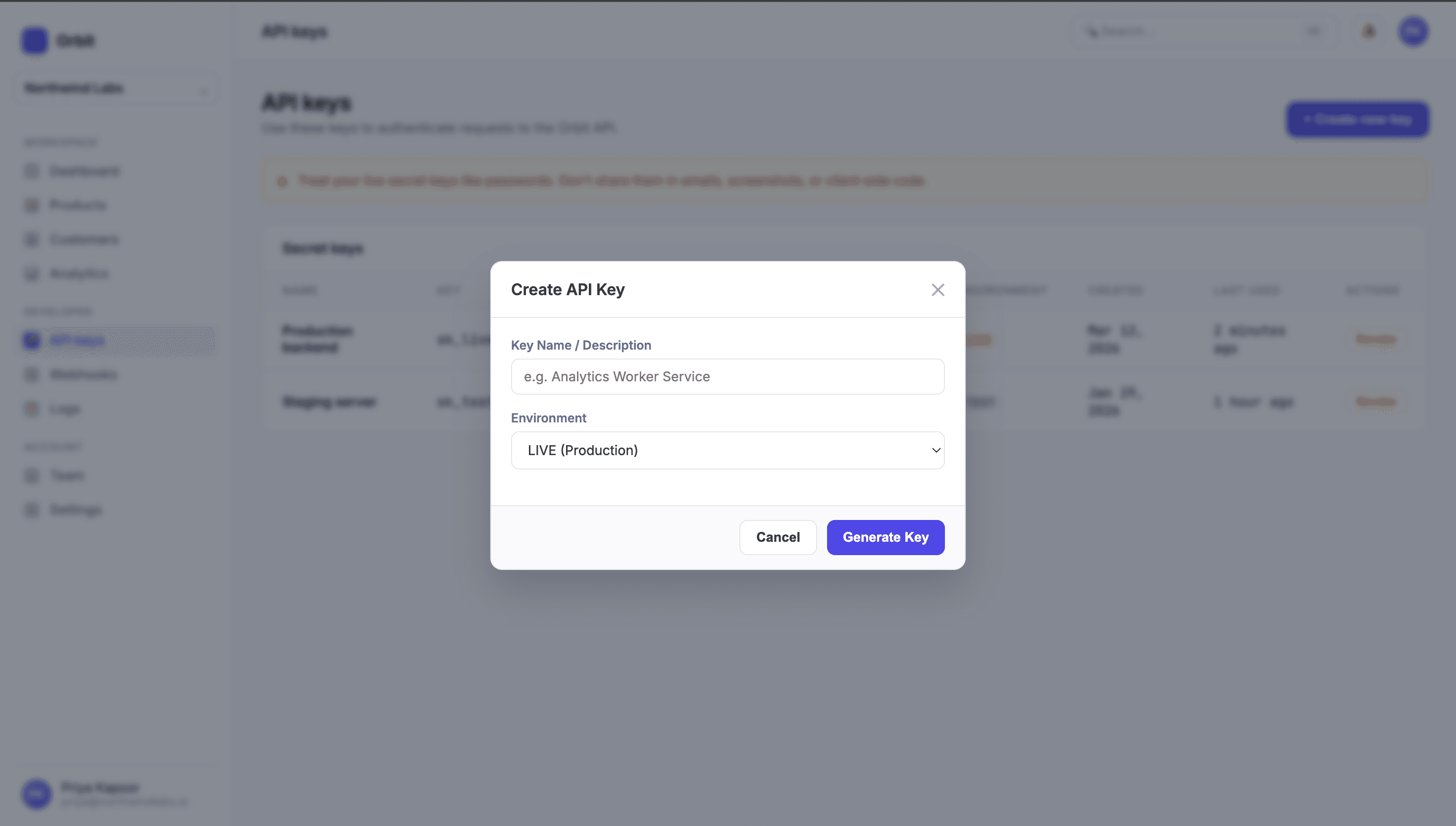
AI finds the moment
Instantly jump to the exact second an action happened—
even if it was done silently without a spoken word.
AI answers with steps
Get clear, step-by-step instructions with clickable timecodes.
No video scrub-through required.
To add API keys in the Orbit dashboard:
- 1.Navigate to the API keys section00:00
- 2.Click to create a new API key
- 3.Enter a name for the key
- 4.Select the production environment
- 5.Click "Generate" to create the key
The process is shown in the first 15 seconds of the recording 00:00 - 00:15. Let me know if you'd like me to inspect the exact screen state during this process.
From first take to client answer
Record
Capture the walkthrough, sharp at any zoom, no lag.
Redact & trim
Blur sensitive areas, cut what doesn't belong.
Send
Share a link, or bundle it into a project package.
Ask AI
AI indexes actions & voice. Clients ask questions and jump straight to the exact second.
Built for how the work actually moves
Client handoff
Wrap a project into a self-serve walkthrough package. Clients ask Demoly AI questions to get frame-accurate answers instead of booking another status call.
- Send a full project as one interactive link
- Redact client-confidential data before delivery
- Let clients search visual actions & spoken steps
Instant bug reporting
Record bugs as they happen with DOM element pinpoints. Developers ask Demoly AI what actions led up to the issue—no manual reproduction steps needed.
- Record and attach full context in one motion
- Pin comments directly to the element that broke
- Visual AI indexes exact UI actions & timecodes
What people say
 Aarav MalhotraFounder, Orbitlane
“Demoly saves me a ton of time when I need to explain a feature. I just record it and send the link.”
 Neha KapoorCustomer Success, Cloudnest
“We started using Demoly for onboarding and it made the whole process much more async.”
 Simran KaurProduct Designer, Layerfox
“I use it whenever I have to walk someone through a design or product flow. Much faster than setting up another call.”
 Yash VermaSoftware Developer, Appforge
“Pretty straightforward and actually useful. I started with demos and now use it for bugs and internal walkthroughs too.”
 Mohit AroraTech Lead, Nimbly Labs
“The fact that I can come back to an old recording and find the exact section is incredibly useful.”
 Dinansh BharadwajSenior Software Developer, Webanix Solutions
“Demoly makes it much easier to explain what's happening instead of writing a long message. I started using it mainly for walkthroughs and bug explanations.”
 Riya MenonProduct Manager, Northstack
“Way easier than writing a long handoff document. The person watching can just go through the product themselves.”
 Arjun MehtaFounder, Brighthive
“Really simple tool, which is what I like about it. Record, make a few edits, share.”
 Rohit SainiFull Stack Developer, Codeharbor
“Demoly has become my default way of showing what I've built. It takes almost no effort to share.”
 Devansh GuptaFounder, Stackora
“I'd rather send a 3-minute Demoly than write a huge message. People understand the product much faster.”
 Pooja NairOperations Lead, Worknest
“It's become one of those small tools we use constantly. Especially useful when someone needs context without a meeting.”
 Ashish AryanSoftware Developer, Delhivery
“It's pretty straightforward to record something, clean it up and share it. The AI search is especially useful when the recording gets longer.”
 Kunal BansalSoftware Engineer, Pixelgrove
“I mostly use it for bug reports now. Showing the actual flow is so much clearer than trying to explain it in Slack.”
 Tanmay ShahEngineering Lead, Devora
“The searchable recordings are probably my favourite part. Finding something from an old walkthrough is actually easy.”
 Ishita RaoProduct Lead, Flowmint
“The biggest win is being able to hand something off without needing to explain it three different times.”
 Ananya IyerCustomer Experience Manager, Vellumly
“Our team uses it a lot for customer walkthroughs. It makes sharing product context much easier.”
 Siddharth JainFounder, Launchgrid
“Demoly makes async demos feel much more practical. I can explain something once and keep moving.”
Start free. Scale with your team.
Record unlimited screen walkthroughs for free, or unlock AI voiceovers, auto-zoom, and team workspace capabilities.
Best for trying Demoly and personal test recordings.
- 3 Active Smart Demos (AI Voice & Auto-Zoom)
- Unlimited Recordings (up to 15 min each)
- Unlimited Collections (Showcase hubs)
- Demoly AI Assistant (3 Demos + 5 Recs/mo)
- Invite unlimited viewer members (Viewer role)
- Demoly badge on public player
For founders, product marketers, and teams creating recurring demos.
- Unlimited Smart Demos & Recordings
- 50 AI-Voiced Demos / seat / mo (BYOK unlocked)
- Up to 30 minutes per recording
- Unlimited Collections with custom branding
- Demoly AI Assistant on all demos, recs & collections
- No Watermark (100% white-labeled player)
- Creator & Admin roles (₹750/seat)
All-inclusive flat plan for growing teams. No per-seat math.
- Unlimited Team Seats (Admins & Creators at ₹0 extra)
- 250 AI-Voiced Demos / mo (Company pooled + BYOK)
- Unlimited Smart Demos & Recordings (Up to 30 mins)
- Unlimited Collections with Custom Domains
- Enterprise AI Assistant across all workspaces
- No Watermark + Priority AI processing
Everything you need to know
01•What is Demoly?
Demoly is a browser-based tool for recording, editing, and sharing interactive product walkthroughs. Creators record via the lightweight Demoly Chrome extension; the recording is processed into an indexed, vectorized event timeline that viewers can search with natural-language AI questions. Recordings are shared as simple web links that stream in any browser with zero setup.
02•What can I use Demoly for?
Anything you'd normally explain with a screen recording: client handoffs and project delivery, product demos, onboarding, training, bug reports with exact reproduction steps, feature walkthroughs, and internal documentation. Demoly is built for agencies, developers, product managers, and support teams who repeatedly explain web software to clients or teammates.
03•How is Demoly different from a normal screen recorder?
A normal screen recording produces a flat video file viewers must scrub through manually. Demoly adds AI semantic search, visual indexing of on-screen actions, interactive timestamps, non-destructive editing, and privacy redaction controls — so anyone watching can find exactly what they need in seconds instead of scrubbing a timeline.
04•Can viewers ask questions about my recording?
Yes. On AI-enabled recordings, viewers type questions in natural language (e.g., 'How do I configure the API keys?' or 'How do I invite a teammate?') and Demoly finds the relevant part of the walkthrough and jumps to it with an exact timestamp, highlighting the relevant UI element.
05•Can Demoly understand things I don't say out loud?
Yes. Demoly indexes what happens on screen (DOM elements, clicked components, input states) as well as what you say, so actions like clicking a setting or opening a specific section can be found by AI search even if you never mention them in your narration.
06•Can I edit a recording after I finish it?
Yes. Non-destructive timeline trimming lets you remove mistakes, cut sections you don't need, and trim long pauses directly in your browser — no need to record the entire walkthrough again.
07•Can I hide sensitive information before sharing a recording?
Yes. Frame-layer redaction brushes let you blur or redact sensitive areas — customer information, passwords, API keys, tokens, internal tools, or anything else confidential — before sharing. Redaction is applied permanently at the frame layer.
08•Do viewers need to install anything or create an account?
No. You share a simple web link, and clients, customers, or teammates can watch directly in their browser — no downloads, extensions, apps, or sign-ups required for viewers.
09•What browsers are supported for recording and playback?
Recording works in Google Chrome via the Demoly extension. Playback and AI search work in any modern browser (Chrome, Safari, Firefox, Edge), on both desktop and mobile.
10•Can I record across multiple browser tabs?
Yes. Demoly can follow workflows that span multiple tabs, so you can demonstrate an entire process across different parts of a web application in a single recording.
11•Does Demoly support voice narration?
Yes. You can capture your microphone while recording, so you explain each step as you go. Narration audio is transcribed and indexed for AI search alongside on-screen actions.
12•Does Demoly support multiple languages?
Yes. AI-generated transcripts can be translated into 30+ languages, so international clients can read along in their preferred language.
13•How long can a recording be?
Recordings on the Free Tier can be up to 15 minutes each, while Pro and Ultimate Tiers support recordings up to 30 minutes.
14•Is Demoly free to use?
Yes. The Free Tier (₹0 forever) includes unlimited recordings (up to 15 min), 3 active smart demos, unlimited collections, and unlimited viewer invites. The Pro Tier (₹750/seat/mo) unlocks 30-minute recordings, 50 AI-voiced demos/seat/mo, no watermark, and custom branding. The Ultimate Tier (₹7,499/mo flat) offers unlimited team seats, 250 AI-voiced demos/mo, custom domains, and enterprise AI assistant.
15•Can I invite my team to Demoly?
Yes. You can invite workspace members and share walkthroughs with your whole team.
Have more technical or administrative questions?
Explore our complete Knowledge Base covering all categorized topics and detailed walkthroughs.